
It seems strange that it is a felony to read somebody else's physical mail, yet email enjoys far fewer legal protections. You may not be able to stop other people from reading your email, but it's fairly easy to make it difficult.
Digitally Signing Email
Digitally signing your email ensures the recipient that your email has not been tampered with since you sent it. It also assures the recipient that it was sent from your email account. It doesn't technically prove you are the person who sent it, but it's a really good first step.
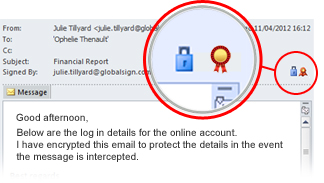
In Microsoft Outlook for Windows you should see a small red ribbon icon on the right indicating the trustworthiness of the digital signature. In Microsoft Outlook for Mac you will see a small grey lock icon on the left that indicates the same thing.
Encrypting Email
Normally, email travels over the Internet in plain text — anyone can intercept and read it. Encrypting your email (only the body is encrypted; the subject is not) makes it very difficult for it to be read by anyone who is not the intended recipient. In my opinion, all business-related email should be encrypted, and probably most personal email as well.
In Microsoft Outlook for Windows, you'll see a blue lock next to an encrypted email. In Microsoft Outlook for Mac, you'll see a grey lock and text indicating the email is encrypted. You don't have to do anything extra to open an encrypted email — Outlook takes care of decrypting it automatically without you even knowing, as long as you are the intended recipient.
How It's Done
Digitally signing your email is easy and inexpensive. You can obtain a Digital ID from many providers, which also allows you to digitally sign Microsoft Office documents and encrypt zip files using PKWare. It's easy to install and works with Microsoft Outlook and other leading email applications.
You can start digitally signing all of your emails immediately. However, to encrypt an email, the person you're sending to must also have a Digital ID. Once they send you a digitally signed email, you'll have all the information you need to start sending them encrypted emails.
Encrypting business communications is cheap, easy, and helps protect confidential information. We encourage all of our clients to use it when communicating with us. For more information, please contact us.