
When deciding what ERP software is best for your company, knowing the types of user interfaces available is key. There are two types: Multiple Document Interface (MDI) and Single Document Interface (SDI). Understanding the difference before you purchase an ERP system can help increase your office's productivity.
In an SDI application, you can only have one window open inside your ERP software at a time. If you want to work in both a Customer Maintenance window and a Contact Maintenance window simultaneously, you would have to open the same application multiple times. Having multiple instances of the same application open can slow your computer and is less convenient for users.
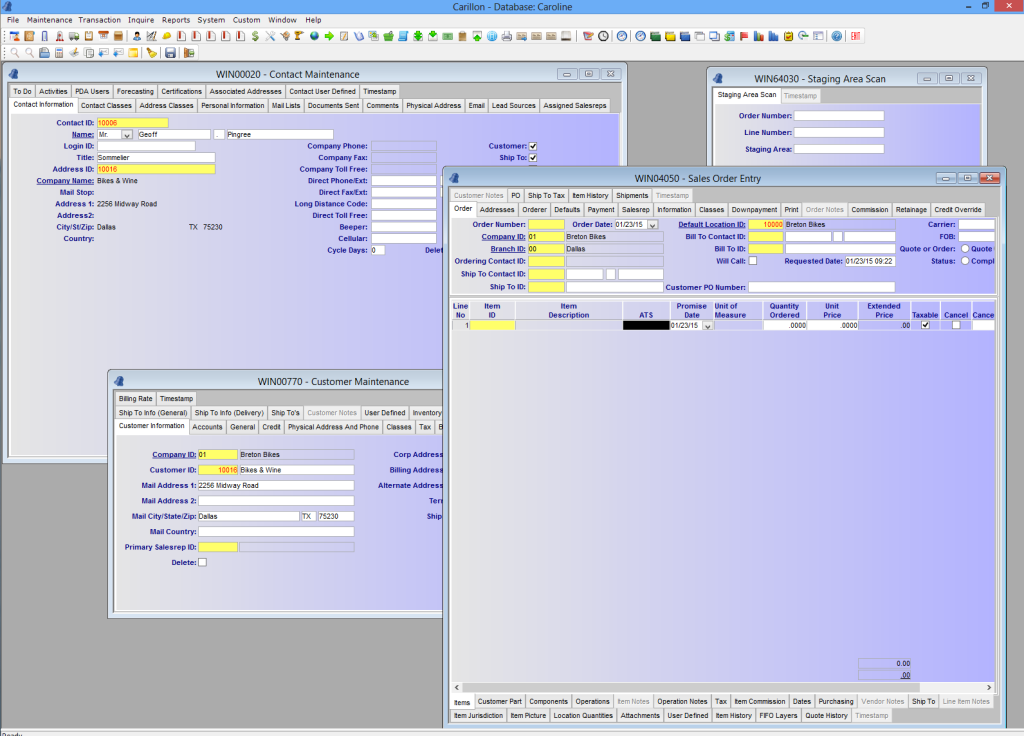
With an MDI application, a single parent window is open and allows other windows to be opened within it at the same time. Instead of having to close one window before opening another, you can keep all the windows you need visible at once.
Consider this scenario: you're entering data into an Inventory window when your best client calls. With an SDI system, you'd need to close your Inventory window to open a Sales Order Entry window. If you forget to save first, that data could be lost and require re-entry. With an MDI system like Carillon® ERP, both windows can be open simultaneously — saving time and letting you pick up right where you left off after the call.
In Carillon® ERP, you can have all of this open in one window!
Carillon® ERP is an MDI application because it makes working more efficient. When evaluating ERP vendors, always ask what kind of user interface they offer. For more information or to schedule a free, personalized demo, please contact us.